



Table of contents
Before we delve deeper into the offerings of the latest WP 7.0 release, let’s unveil a truth that must be spoken.
WordPress 7.0 didn’t arrive smoothly. It was deliberately slowed down.
The original release window (April 2026) was pushed, not because of marketing timelines or feature creep, but because the core team made a call most platforms avoid, which is to ship stability over speed.
The delay was driven specifically by the need to stabilize real-time collaboration, a cornerstone feature of this release.
That decision tells you everything about how seriously this version is being treated.
Fellow developers, WP enthusiasts, business/brand owners, save the date ~ WordPress 7.0 is now officially scheduled for May 20, 2026.
Not tentative. Not projected. Locked.
In the detailed guide that follows, we will be exploring the following concerns;
~ Where WordPress 7.0 actually sits in the roadmap
~ Is your site actually ready for WordPress 7.0?
~ Understanding what actually changed between 2025 and now
~ Decoding what’s new in WordPress 7.0
~ What WordPress 7.0 isn't (and why that matters)
~ Benefits for existing websites
~ Benefits for developers working on new website development
~ How to stay updated and prepare your site
TL;DR
Where WordPress 7.0 actually sits in the roadmap
To understand this release, you need to zoom out.
The Gutenberg roadmap has always been structured in phases:
Phase 1 → Editing (Block Editor)
Phase 2 → Customization (Full Site Editing)
Phase 3 → Collaboration
Phase 4 → Multilingual
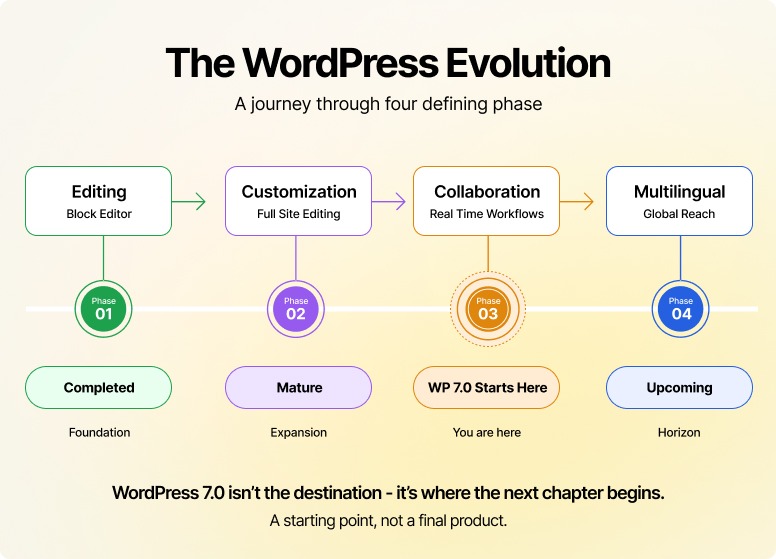
WordPress 7.0 is not the completion of Phase 3.
It is the first serious delivery of Phase 3 capabilities at scale, particularly around real-time collaboration and workflow improvements.
That distinction matters.
Because it tells you this isn’t the end of something.
It’s the beginning of how WordPress becomes team-native.
Is your site actually ready for WordPress 7.0?
Before you consider upgrading, it’s a smart move to take a hard look at your current setup.
WordPress 7.0 raises the baseline, through tighter architecture, modern PHP alignment, and evolving editor workflows. That means older, loosely maintained environments are far more likely to run into friction.
You need to ask yourself these questions.
~ Are you still running on an outdated PHP version (below 7.4 or not yet aligned with PHP 8.x)?
~ Are critical parts of your site dependent on plugins that are no longer actively maintained?
~ Is your backend already struggling with performance, slow editor loads, laggy admin screens, or large dataset handling?
~ Do you lack a proper staging environment to safely test updates before pushing to production?
If the answer is “yes” to even two of the above, your site isn’t ready for WordPress 7.0, at least not yet.
This doesn’t mean you can’t upgrade. It simply means that you shouldn’t upgrade blindly.
Understanding what actually changed between 2025 and now
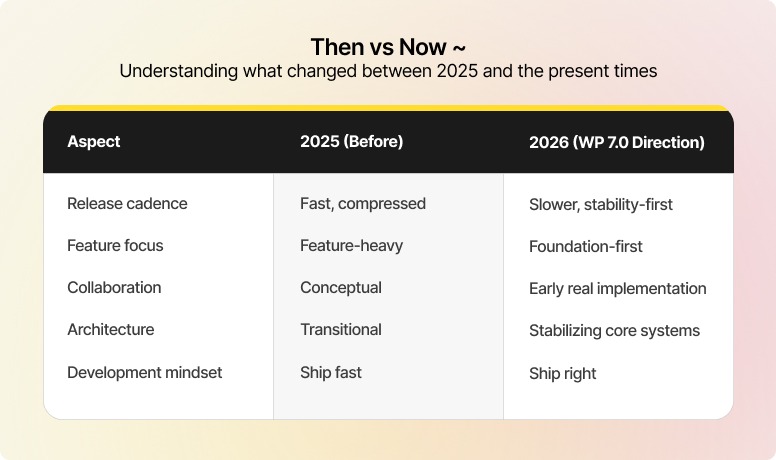
After a turbulent 2025 marked by legal battles and a compressed release schedule, here’s an insight into what actually happened.
~ A slower release cadence
~ A heavier focus on stability and architecture
~ Extended development cycles for complex features like collaboration
And most importantly, a conscious decision to not rush Phase 3 into production half-baked.
Matt Mullenweg, co-founder of WordPress, commenting in the official Making WordPress Slack workspace, posted;
That’s why 7.0 feels different.
Because instead of stacking features, WordPress is now shipping foundational capabilities that change behavior inside the platform.
Decoding what’s new in WordPress 7.0
Let’s reset expectations.
WordPress 7.0 isn’t a headline-heavy release.
It’s not trying to impress you with a laundry list of finished features. It’s doing something far more important, and that is laying down the next layer of how WordPress is meant to work.
Most of what you’ll see here has been in development for years. What 7.0 does is push these efforts out of theory and into an early, usable form.
Here’s what that actually means when you’re inside WordPress every day:
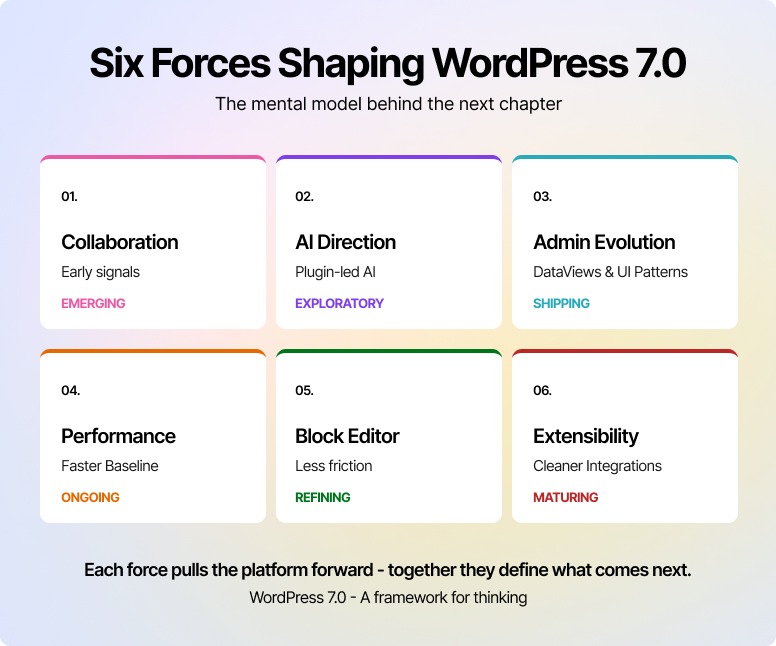
Real-time collaboration (no longer hypothetical)
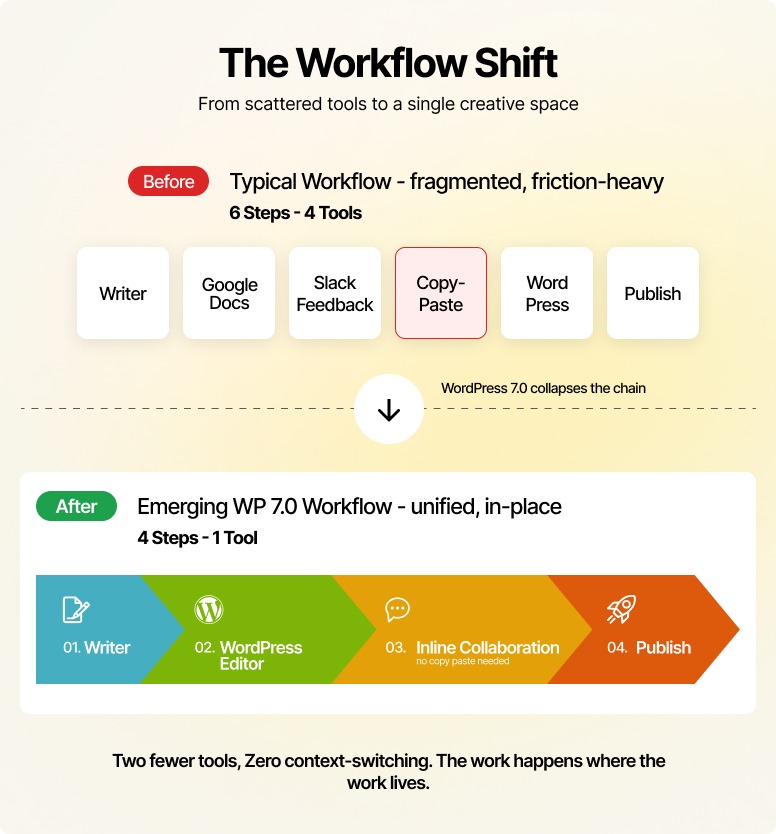
For years, WordPress has been a single-user-first system with basic locking mechanisms.
That’s changing.
With 7.0, collaboration starts to become tangible:
You’ll begin to see signals of other users in the editor
Early groundwork for simultaneous editing
Initial steps toward resolving edit conflicts more gracefully
This is part of the broader Phase 3 (Collaboration) initiative, and it’s still in progress.
This is not a finished Google Docs-style experience yet.
But it’s the first time collaboration in WordPress feels like a direction with momentum, not just an idea on a roadmap.
AI in WordPress (emerging, not enforced)
AI is already in the ecosystem, but through plugins, not core.
That doesn’t radically change with 7.0.
What is changing is the direction of travel:
Early groundwork is being explored for more consistent AI integrations
Discussions around standardization are active
Some initial capabilities may start surfacing in experimental form
But there is still no fully standardized, core-level AI framework you’re expected to build around.
For now, the model remains:
Plugin-led innovation
Flexible integrations
No lock-in to a single AI provider
Which, from a developer and business standpoint, is exactly where it should be.
Admin experience (quietly becoming more application-like)
There’s no dramatic “new admin UI” in 7.0.
Instead, WordPress continues a shift that’s already underway, moving the admin from a collection of pages to a more structured interface system.
Work like DataViews is part of this evolution.
Here’s what you’ll start noticing:
More consistent ways of handling and displaying data
Interfaces that feel less rigid than traditional list tables
A gradual move toward reusable UI patterns across the backend
This isn’t a redesign you toggle on; on the contrary, it’s a foundation that future versions will build on.
Performance & technical baseline (where the real work is happening)
This is the part most people overlook, where the real value lies.
WordPress 7.0 continues tightening its technical baseline:
Stronger alignment with modern PHP environments (7.4+ and moving toward 8.x readiness)
Incremental improvements in block editor performance
Ongoing cleanup of legacy constraints that slow development down
You won’t “see” most of this.
But you’ll feel it in faster editor interactions, fewer compatibility issues over time, and in a codebase that’s easier to extend without breaking things.
This is what separates a site that scales from one that constantly needs patchwork fixes.
Block editor refinements (less friction, more control)
The block editor isn’t getting reinvented in 7.0, but it is getting better in the ways that matter.
You can expect:
More consistent behavior across blocks
Incremental improvements in styling workflows
Better alignment between themes and editor capabilities
Nothing flashy.
But if you regularly build or manage content, these are the changes that reduce friction over time.
Extensibility (still the backbone, now better aligned with modern workflows)
WordPress has always been extensible. That’s not new.
What’s evolving is how that extensibility fits into the block-first world.
With 7.0, the direction continues toward:
Cleaner integration points with the block editor
Better alignment with modern JavaScript-driven development patterns
More predictable behavior when extending core functionality
There’s no single “connectors system” being introduced here.
Instead, this is WordPress doing what it does best, which is refining the foundation so everything built on top of it works more reliably.
What WordPress 7.0 isn't (and why that matters)
Before you get swept up in the hype cycle, let's be honest about what this release is not.
Because half the noise around WP 7.0 comes from people projecting features onto it that simply aren't there yet.
This is not a Google Docs replacement
Real-time collaboration is arriving, but in early form. You'll see presence signals, the beginnings of simultaneous editing, and better conflict handling. What you won't see is a fully polished, multi-cursor, comment-thread-everywhere experience. That's the destination, not the starting line.
This is not an AI-first release
There's no native AI assistant baked into the core. No "Write with AI" button. No standardized prompt framework. AI continues to live in the plugin layer, exactly where it's been. If you were expecting WordPress to suddenly feel like Notion AI or Wix's AI builder, recalibrate now.
This is not a redesign
The admin isn't getting a fresh coat of paint. DataViews and the underlying UI patterns are evolving quietly, but you won't log in on May 20 to a visually transformed dashboard. The shift is structural, not cosmetic.
This is not a "must update on day one" release
Nothing in 7.0 is so urgent that it justifies skipping your usual testing discipline. The smart move is the patient one, let the release breathe, watch the early reports, then move.
This is not the end of Phase 3
It's the beginning. Treating 7.0 as the final word on collaboration is like reviewing a novel after reading the first chapter. The interesting story is what comes next.
The point isn't to dampen excitement. It's to make sure your excitement is pointed at the right things, because that's where the real value of this release actually lives.
What this means for existing WordPress sites
If you’re already running WordPress in production, this isn’t a “rebuild everything” moment.
But it is a moment to understand where friction will reduce and where expectations are about to shift.
Here’s how that plays out depending on how you use WordPress.
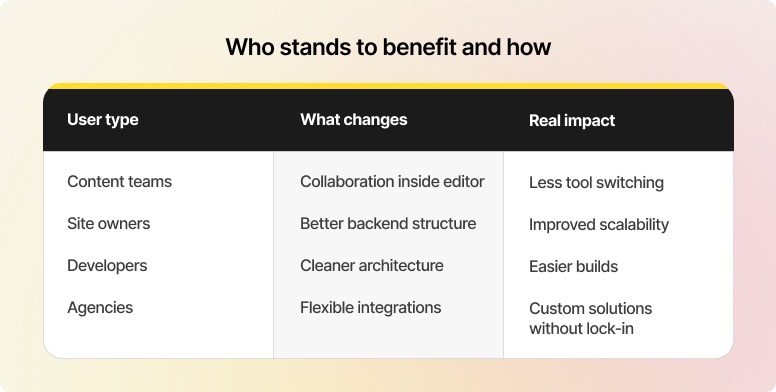
For site owners: a backend that scales a little more cleanly
If you manage a growing site, you already know where WordPress starts to feel heavy, content lists, media libraries, and user management.
What’s changing isn’t a flashy redesign; it’s the structure underneath.
As newer systems like DataViews continue to roll out, you can expect:
More consistent handling of large datasets
Better performance in content-heavy environments
A backend that feels less rigid as your site grows
It won’t transform overnight. But it will start removing the small inefficiencies that add up over time.
For developers: a platform that’s slowly getting easier to work with
Expect no dramatic tooling overhaul lands in 7.0, but the direction is clear.
WordPress continues to align with:
Modern PHP environments (moving toward 8.x readiness)
Ongoing improvements in block-based development
A cleaner, more predictable editor ecosystem
If you’re already building with blocks, this release makes that path more stable.
However, if you’re not, it’s another signal that legacy approaches will keep getting harder to maintain.
For agencies: more flexibility, less forced standardization
One of WordPress’s biggest strengths remains untouched, and that’s a good thing.
There’s still no enforced AI layer in core, a single “correct” way to extend functionality, and no lock-in to specific tools or providers.
The Abilities API lets you integrate client-preferred AI tools without having to build custom plugin bridges each time.
What you do get is a platform that’s gradually improving how integrations behave within the block ecosystem.
Which means cleaner implementations over time, fewer workarounds, and more room to build solutions around client needs rather than platform constraints.
Benefits for developers working on new website development
If you’re starting fresh on WordPress 7.0, you’re not inheriting the mess most older builds carry.
You’re starting cleaner, and that changes how you build.
Editorial workflows finally move closer to WordPress
Collaboration isn’t fully native yet, but it’s close enough that you can start designing workflows inside WordPress, not around it. Less duct-taping Google Docs into the process.
AI, without being boxed in
No forced AI layer. No “use this or nothing” approach. You can plug in the AI stack your client actually wants and swap it when needed. That flexibility is the win.
Block development, without the friction it used to have
The tooling is no longer the bottleneck. Spinning up custom blocks, extending them, and making them production-ready is a far smoother process than it was even a year ago.
Design becomes easier to sell (and faster to finalize)
With better previews and styling controls, clients don’t have to “imagine” outcomes anymore. They can see them, and that alone cuts revision cycles more than any process doc ever will.
Patterns actually behave like a system now
You’re not just creating templates, you’re building reusable structures that work with custom blocks, not against them. That’s a big shift for scalability.
A modern stack from day one
No legacy baggage. PHP 7.4+ as a base, with a clear move toward PHP 8.x. You get to experience better performance, fewer surprises, and cleaner builds.
Interactivity, without dragging in a full frontend framework
The Interactivity API is still evolving, but it already lets you handle filtering, pagination, and dynamic states without bolting on heavy JS solutions.
How to stay updated and prepare your site
With a major release this close, this isn’t the time to “update and hope.” It’s time to get deliberate.
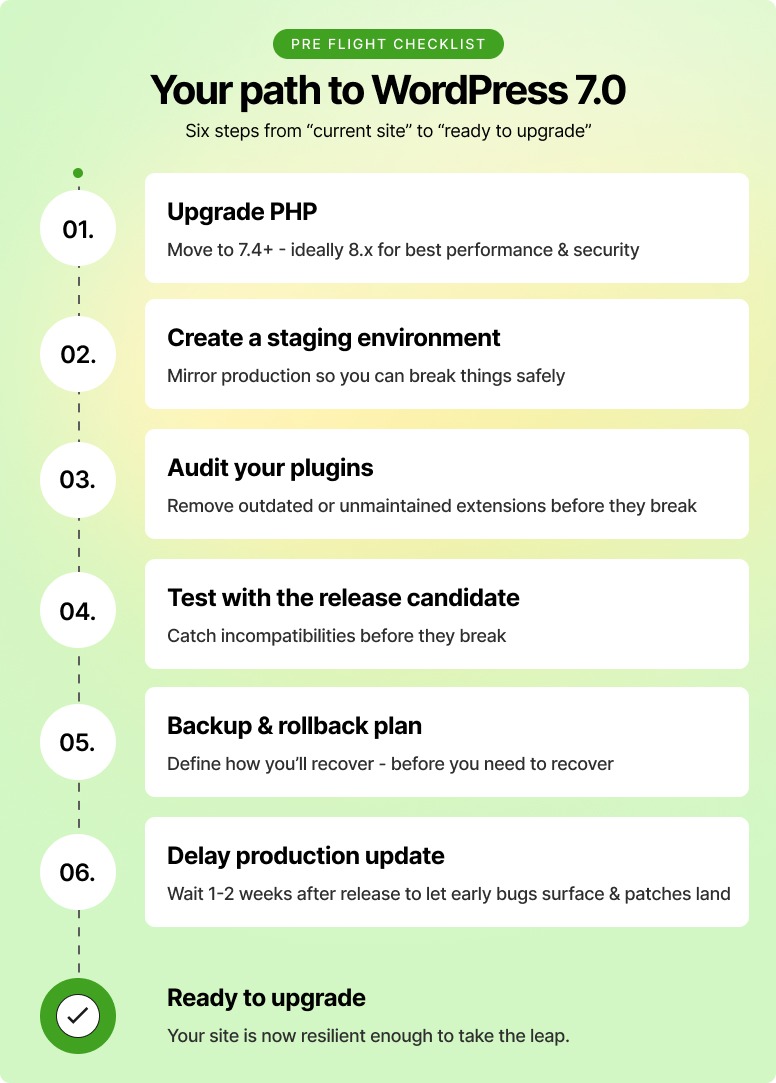
Here’s what actually matters:
Start with your hosting, not WordPress
Make sure you’re on a solid PHP baseline (7.4+ minimum, ideally PHP 8.x). Most upgrade issues don’t come from WordPress; they come from outdated environments.
Test on staging, always
Spin up a staging copy and run the latest release candidate. That’s where plugin conflicts, theme quirks, and edge cases show up before they hit production.
Audit your plugin stack (this is where things break)
Don’t just update blindly. Check which plugins are actively maintained and tested against newer versions. Anything abandoned or critical to your workflow needs extra attention.
Stop relying on guesswork & follow core updates directly
If you want signal, not noise, track updates on the official Make WordPress Core blog. That’s where real changes, not recycled summaries, show up first.
Read the field guide if you build anything custom
If you touch themes, plugins, or custom code, this isn’t optional. The developer notes tell you exactly what changed and what might break.
Back up like you expect something to go wrong
Because sometimes it does. Full backup, quick rollback plan. Basic discipline often gets skipped.
Don’t rush the update window
Unless there’s a security reason, give it a week or two. Let early adopters surface the weird edge cases so you don’t have to.
Watch Gutenberg, not just core releases
If you really want to stay ahead, follow the Gutenberg plugin updates. That’s where changes show up first; core just packages them later.
The final question: Are you ready for WordPress 7.0?
WordPress 7.0 isn’t a flashy upgrade. It’s a foundational shift.
It’s less about new features and more about how WordPress is meant to work going forward.
Here’s what you need to do, nothing more, nothing less:
Clean your stack → Update PHP (preferably 8.x), remove dead plugins, fix weak dependencies
Test before you touch production → Staging isn’t optional anymore
Expect workflow changes → Collaboration is coming into WordPress, not around it
Build modern, or fall behind → Blocks, patterns, and lighter interactivity are the path forward
Don’t rush the update → Let early issues surface, then move
So, if your setup is modern, you’re fine. However, if it’s held together with patches and legacy shortcuts, 7.0 will expose it.
Either way, this isn’t just an update.
It’s a reboot.