



Table of contents

Ad platforms have been sending the same message all year.
Google said it on the Ads Decoded podcast. Meta has built its entire Advantage+ pitch around it. The line varies, but the point is identical: your AI is only as good as the data feeding it.
Google's own guidance around Data Strength puts it plainly -
“Finding better intent users means finding users more likely to convert for your business. Journey Aware Bidding, the framework Google is currently developing, pulls every conversion touchpoint into bidding models. Not just the clicks and form fills platforms have historically relied on. The system wants to know what a real customer looks like. Right now, most accounts aren't telling it.”
Agreed. Advertisers have improved online conversion tracking. There are cleaner events, enhanced tracking, and better tagging.
The credit also goes to the fact that the infrastructure for online conversion measurement is mature and well-documented. Think about how routine online performance tracking of your paid ads has become thanks to GA4 and platform pixels.
That said, the harder problem remains unresolved and that's what happens after the browser closes. Yes, the offline conversion tracking (OCT).
I am sure we’ve come a long way mapping the customer journeys. But the journey doesn’t end at a website visit. It goes all the way through to phone calls with sales reps, signed contracts, and scheduled consultations.
Result is that most conversion tracking stops at the browser, and leaves a semi-truck-sized blind spot in your attribution data.
Of course, those lower funnel conversion actions exist in your CRM, in the sales team's pipeline, and in call logs. But not in your ad platform for it to bring you back more high quality leads, unless you feed the data there.
And as privacy changes veils more visibility, that gap in performance measurement widens. The fewer signals the ad system has, the more weight it puts on the ones you give it.
In another words:
If the performance measurement excludes offline actions, your ad campaigns are being optimized for incomplete signals.
That’s when you realize that you need offline conversion tracking to:
- Map fragmented online to offline user journeys.
- Connect marketing efforts with the real business outcomes.
- Give bidding systems a clear portrait of what a “good” customer looks like.
Whether you're running ads on Google, Meta, or LinkedIn, if you aren't feeding the conversion data back into the bidding engine, you aren't a performance marketer.
This playbook gives you the infrastructure to connect ad spend to offline conversions. We’ve built these data loops for enough accounts to know one thing: the marketers who win aren't the ones with the most clicks. They are the ones who give the AI the right profit signals.
What are offline conversions?
Offline conversions are valuable business outcomes that your ad spend inspired but your tracking pixel didn’t notice. That’s because the lead filled the form online but took the "real-world" action after leaving your site.
These offline outcomes cover more ground than most marketers account for. They include any milestone that moves a lead closer to revenue, not just the final closed deal:
- A trial user became a paying customer after a sales call.
- A funded deal got closed 60 days after the first demo.
- An in-store purchase by a customer who clicked a paid social ad last week.
- A student visited a campus to enrol in a course they first found through paid search.
- A car buyer walked into a dealership after three weeks of online research.
In B2B specifically, the lead-to-sale conversion tracking gap is structural.
So, for sake of example, a lead fills out a form and registers as an MQL. That part most teams can measure.
But from MQL to SQL to opportunity to closed-won, every stage happens inside a CRM, on calls, in meetings. This offline touchpoints data is neither attributed to the ad that drove it nor is it passed back to the bidding algorithm.
These actions don’t happen on your website, but are catalyzed by your paid ads.
Said another way: Offline conversions are the outcomes your ad spend is trying to drive, but your platform can’t see by default.
It’s with the offline conversion tracking you tell the platform which online conversions ended up becoming revenue-generating customers.
What is offline conversion tracking (OCT)? Why most performance campaigns miss true ROI
OCT is a method of ad performance measurement by feeding offline business outcomes back into the ad platforms that generated the original click.
Doing so helps advertisers connect the ad spend impact to real business outcomes. But more importantly, the real "end game" of feeding your CRM’s "gold" data back into the ad platform’s AI tells it to stop bidding on users who only fill out forms and start bidding on leads who actually give you money.
In short: Tracking offline conversion is essentially making sure that the ad platform’s bidding models are trained to find the leads that are of higher value and higher propensity to convert for you.
Having understood the historical context of leads and which keywords, devices, demographics, and times of day to correlate with them, algorithms will go after similar users in future.
Offline conversion tracking applies across B2B, B2C, lead generation, and e-commerce. Anywhere the customer journey crosses from digital to real world before the transaction completes.
The high-stakes advantages of OCT when you implement it correctly
- You can direct bidding algorithms to go after the most valuable leads based on actual margins.
- You can include or exclude instances where a conversion changed after the pixel fired. This includes sales made via a rep, returns that happened 30 days later, or sales to repeat customers.
- You stop relying on flawed attribution models to guess which path works.
- You provide the signals necessary for AI to find your "Power Audiences", the small percentage of users who drive the majority of your revenue.
Without OCT, you under evaluate high-performing campaigns. And the right intent never makes it to bidding models.
Ultimately, the combination of powerful automation and low-quality conversion data wastes your budget in only producing high volume, low close rate, and a sales team that doesn't trust the leads coming from paid media.
The honest constraint?
The offline conversion setup requires operational discipline. Something that the technical configuration alone can't provide. The data lives in the CRM. Someone has to own, keeping it clean and updating it on a reliable cadence.
Sadly, that's where most offline conversion tracking implementations break down, not in the platform setup, but in the week-to-week data hygiene that makes the upload pipeline trustworthy.
How does offline conversion tracking work?

The core flow of offline conversion tracking across platforms is:
- A user clicks your ad. The platform appends a unique click identifier to the landing page URL depending on the platform.
- Your website captures that identifier and stores it with the lead's contact information. In the form of a cookie, hidden field, CRM field, or database record.
- The lead gets recorded in your CRM and progresses through your pipeline.
- When the deal closes, you send the offline conversion back to the ad platform with the original click ID.
- The platform matches it to the original click and attributes the conversion to the right campaign, keyword, and creative.
What are Click IDs and Hashed PII?
To link an offline conversion (like a sale in your CRM) back to the online ad interaction, you need a shared identifier. It’s a piece of data that exists in both systems and serves as a matching key. The platform uses it to attribute an offline activity to the specific campaign, keyword, and creative that drove the original visit.
.png)
There are two matching keys major advertising platforms use: Click IDs and Hashed PII.
Click IDs: The primary matching key
When a user clicks your ad, the platform automatically appends a unique identifier or a Click ID to your landing page URL. Google calls it a GCLID. Meta uses FBCLID. For Microsoft, it’s MSCLKID. LinkedIn uses li_fat_id.
Your site captures this click ID, stores it alongside the lead record. And when that lead eventually closes offline, you upload the conversion data back to the platform with the original ID attached. The platform matches it to the originating click.
That's the romantic version of the story.
Now, the messy, real-world version:
Between iOS 14.5 and browser-level privacy restrictions like Safari's Intelligent Tracking Prevention, Firefox's Enhanced Tracking Protection, and Chrome's Privacy Sandbox , Click ID capture rates have fallen. That’s because these privacy controls block cross-site tracking by restricting cookies, storage, and other tracking methods.
When that happens, the ID doesn’t get stored with the lead and so the later offline conversion cannot be matched back to the original ad click.
How does that affect tracking offline conversions?
Not that your ads stopped working, but your ad performance reporting lost part of the journey. If the platform doesn't see the conversion-
- The algorithm assumes the click did not get converted.
- For the lack of attribution, your offline conversion uploads will under-report real performance.
- You stop spending budgets on high-performing campaigns that are driving your revenue.
Hashed PII (Personally Identifiable Information): The privacy-safe fallback
Modern platforms now accept SHA-256 hashed first-party identifiers (email and phone numbers) as supplementary match keys.
- When a user submits your form, you capture their email address and phone number.
- You then hash that data by transforming it into a string of characters or an encrypted code to protect user privacy. And then, send it to the platform along with the conversion event.
- Google or Meta then matches that hash against the user account in their database, across devices, across browsers, with no cookie required.
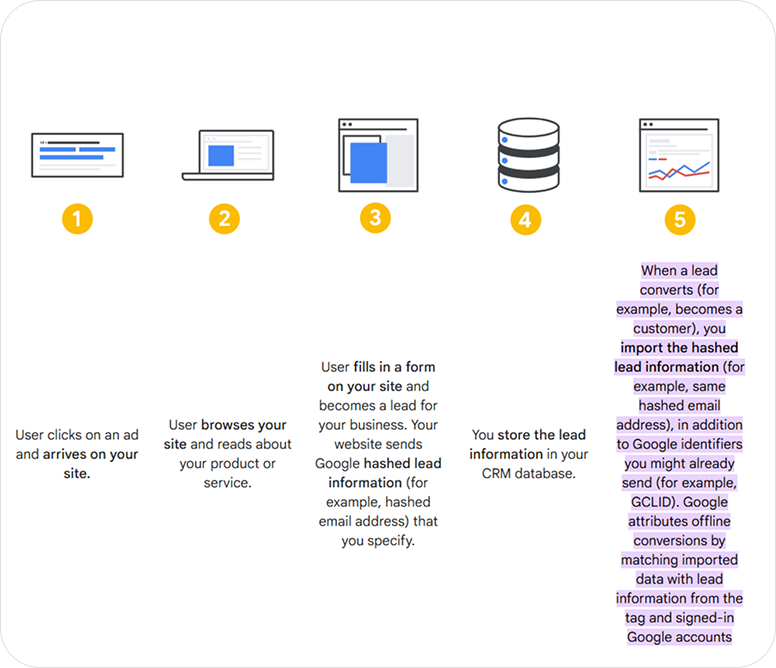
This is a more resilient option identifier for tracking offline conversions.
Say, a user clicks your ad on a mobile device. Tracking this user's offline transaction would be a challenge if they’ve enabled privacy settings like iOS 14.5’s App Tracking Transparency.
The traditional Click ID is automatically removed from the landing page URL before it reaches your site. However, because their hashed email address stays the same, it acts as a persistent link that allows the conversion to be recorded.
Google's internal data confirms this. It says,
How to prepare user data before hashing it for privacy-safe matching
Before you send user-provided data into an ad platform, you first clean it into a standard format. Then you hash it with SHA-256 so the raw value is not exposed.
If you skip the cleanup step, the same person can produce different hashes and you might not get the highest match rates. The ad platform fails to match the hashed value to the user it already knows, which means weaker offline conversion matching.
The normalization rules are simple:
- Email: Lowercase the entire string and trim all whitespace. John@Gmail.Com and john@gmail.com do not produce the same hash.
- Phone: Strip all formatting - spaces, dashes, and parentheses. Convert the number to the E.164 format (e.g., +12223334444).
- Name: Lowercase and trim. Split first and last names into separate fields before hashing.
Which platforms support offline conversion tracking?
Because Google is an established player in this space, most performance marketers think Google ads offline conversion tracking is the only option. The reality is that every major ad platform —Meta, LinkedIn, Microsoft—now has a dedicated offline pipeline.
1. Google Ads
That said, Google has the most mature OCT infrastructure of any platform. They also offer three distinct methods for tracking offline conversions. This creates complications for agencies thinking where to invest their technical resources.
We’ve broken down the three approaches below.
.png)
2. Meta (Facebook / Instagram)
Meta's offline conversion tracking infrastructure consists of connecting your marketing data with Meta's ad optimisation systems through the Conversions API (CAPI).
The good thing about Meta Ads is that it takes any information you can provide. Facebook Click ID, Facebook Pixel Cookie, hashed name, hashed phone number, email address, country, state, ZIP Code…
Google ads, on the other hand, relies on a single parameter. Which is a disadvantage as the more data you share with the system, the more are the chances that the offline conversions get attributed to the right person and the right ad.
3. Microsoft advertising
Microsoft Ads mirrors Google’s legacy approach using the MSCLKID. Most of the setup is similar to Google ads offline conversion tracking.
But a few caveats here:
- One must wait at least two hours after creating a new conversion goal before the first upload. Attempt an upload sooner and Microsoft will reject the data. Without an error message sometimes.
- Even after a "Success" confirmation, data can take up to six hours to appear in your dashboard. Better not to verify your data or troubleshoot a "broken" setup until at least six hours have passed since the upload.
- You should wait at least one hour after the actual ad click occurred before attempting to upload a conversion for that specific MSCLKID. The system requires this buffer to register the original ad interaction before it can accept a matching offline event.
4. LinkedIn
useless for six-month sales cycles that conclude in a boardroom.
If you have low lead volume or zero developer resources, manual CSV uploads work fine. You export your CRM data, format it to LinkedIn’s specific template, and upload it into Campaign Manager. This is the "entry-level" approach for agencies still proving the value of LinkedIn spend to a skeptical client.
Serious B2B advertisers eventually graduate to the LinkedIn Conversions API (CAPI). You can send data through either:
Direct integration: Needs technical expertise but offers the most control over data mapping and ID matching.
Or,
No-Code Automation: Partner integrations with tools like Zapier, LeadsBridge, or LiveRamp connect your CRM and LinkedIn. They monitor your system for "Closed-Won" events, format the payload, and transmit it via API.
4 ways to set up offline conversion tracking
Offline conversion tracking usually means taking a conversion that happens in your CRM or sales process, then sending it back to ad platforms. The implementation method is just the path you use to move that data from your business systems into those ad platforms. There are options to implement it.
Option 1: Manual CSV or Google sheets upload
This is the simplest setup. You export closed deals from your CRM on a schedule, format the file exactly as the platform expects, and upload it manually or through a scheduled sheet import.
It works fine for low volume or for testing whether your data is even matchable. But it gets fragile fast because humans have to handle formatting, timestamps, click IDs, phone normalization, and hash prep. If you botch a field or the export timing, the upload happens, but with bad data.
Option 2: No-code automation
This is your sweet spot. Instead of manual chores, let tools like Zapier, Make, or n8n act as the connector. They capture offline conversion actions, and then integrate the data automatically to the ad platform. The benefit is speed. You can launch and are not required to build a full engineering stack.
Any downside? Yes, “no-code” still means a lot of setup work. You still have to-
- Map fields correctly
- Format phones in E.164
- Normalize emails
- Hash data
- Manage time zones
- Handle webhooks,
- and suck up the failures.
Plus, at meaningful volume, free plans usually are not enough, and self-hosted tools trade subscription cost for maintenance overhead.
Option 3: Dedicated OCT platforms
These are specialized offline conversion tracking tools built for this exact job. They usually handle click ID capture, PII normalization, SHA-256 hashing, uploads to multiple platforms, and reporting in one place.
This option makes the most sense when you are running tracking across several ad platforms. Also works when the team needs visibility into match rates, upload status, and email alerts when conversions approach the upload window deadline.
For teams running OCT across Google, Meta, Microsoft, and LinkedIn simultaneously, the operational clarity explains the ‘why' behind the subscription cost.
Option 4: Direct API or server-side integration
This I think is the most controlled approach over the data pipeline typical of technical teams and large scale operations.
That’s because the engineering team builds a direct connection from your CRM or warehouse into each ad platform’s API. So your business controls exactly what gets sent, when it gets sent, and how retries and errors are handled.
It is the strongest choice for scale and reliability. No wonder, it is also the most expensive to build and maintain.
Plus, the need to monitor, alert, and document never goes away. Otherwise, API changes or authentication glitches can break the pipeline. If nobody notices until ROAS drops, the setup has already failed operationally.
How to choose the setup for offline conversion tracking
- Use manual uploads: If you are validating the process or have a small number of conversions.
- Use no-code automation: If you want speed but don’t have engineering support.
- Use dedicated OCT platforms: If you want multi-platform tracking with reporting and diagnostics.
- Use direct API integration: If you have a technical team and need full control at scale.
Is hashed data anonymous? How to manage privacy and compliance in OCT?
If a team thinks hashing data makes it “anonymous”, I’ll ask them to smell the coffee. The legal reality is that it’s still personal data, and the liability is real.
Under GDPR, SHA-256 hashed email addresses and phone numbers are classified as pseudonymized data, not anonymized.
Because a hash can be reversed if the original data is available—a process called a "dictionary attack"—it retains full legal personhood.
Also, hashing the data before it hits the platform does not eliminate the risk of processing that data without consent in the first place.
Many marketers enable features like Google’s Enhanced Conversions or Meta’s Advanced Matching and assume the platform handles the legalities. These tools often "scrape" form data directly from the browser to improve match rates.
Privacy experts are exactly fans of this practice. GDPR mandates data minimization. It means you should collect the data that’s necessary for a specific purpose. If your system is scraping every form field and sending it to a platform without your users’ knowledge, it’s a compliance risk.
Said another way, every compliance obligation that applies to raw PII applies equally to its hashed form. Now, coming to maintaining compliance in offline conversion tracking.
GDPR requirements (EEA, UK, Switzerland)
- You need a lawful basis to process and share hashed identifiers with ad platforms.
- Your privacy policy must explicitly disclose the sharing of hashed identifiers for conversion matching.
- You need a Data Processing Agreement with each platform you share data with.
Cross-border transfers to US platforms (Google, Meta, LinkedIn) require an applicable transfer mechanism, currently the EU-US Data Privacy Framework.
Consent mode v2 — Mandatory for Google in EEA/UK
- Running Google campaigns targeting users in the EEA, UK, or Switzerland?
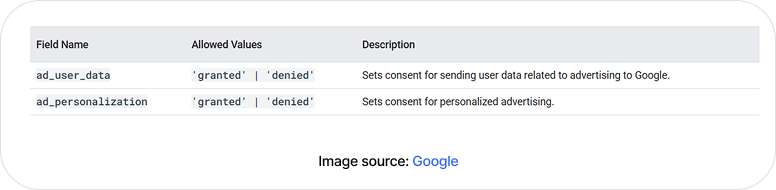
- Consent Mode v2 is mandatory. You must signal ad_user_data and ad_personalization consent on every conversion upload. Users who have not consented cannot have their data used for offline conversion matching. Your consent management platform (CMP) must be integrated with your OCT pipeline. When a user denies consent, that record must be excluded from all uploads.
CCPA / CPRA (California)
California favours an opt-out model over the opt-in model we see elsewhere. Businesses must provide a 'Do Not Sell or Share My Personal Information' mechanism and honour Global Privacy Control (GPC) signals.
For businesses, this means you can’t just bury your head in the sand; you must provide clear 'Do Not Sell or Share My Personal Information' options and respect Global Privacy Control (GPC) signals like they’re a firm 'no thank you.'
Sending hashed customer data to ad platforms for cross-context behavioral advertising is a move that likely triggers those opt-out requirements. So, ensure your OCT pipeline respects GPC signals and excludes opted-out records from all uploads.
Offline conversion tracking best practices
1. Data capture
- Capture GCLID, MSCLKID, FBCLID, and li_fat_id in hidden form fields via JavaScript on every landing page.
- Store click IDs in a first-party cookie as a backup as URL parameters are lost when users navigate between pages.
- Capture email and phone at form submission for ECL hashing. Capture what is available even if fields are optional.
- Test every form variant: multi-step forms, chatbot lead capture, and phone-call-to-form flows all need separate capture logic.
- Verify GCLID capture in staging before every campaign launch.
2. Normalisation and hashing
- Email: lowercase entire string, trim whitespace, remove dots for Gmail addresses
- Phone: strip all formatting, convert to E.164 (+[country][number]) before hashing
- Name: lowercase, trim, split into first_name and last_name separately
- Apply normalisation before SHA-256 — one uppercase letter = different hash = failed match
- Test hash outputs with a known input before deploying: validate the output matches expected SHA-256 for your normalised test string.
3. Upload cadence and data freshness
- Upload conversions daily at minimum — stale data degrades Smart Bidding performance.
- For high-velocity B2C businesses, upload every 6–12 hours; some API integrations support near-real-time.
- Use order_id or event_id as a deduplication key on every upload — prevents double-counting from repeated runs or parallel tracking.
- Build a retry mechanism for failed uploads — a single missed day can create attribution gaps that are hard to backfill.
4. Long sales cycles (90+ Days)
- Set mid-funnel milestones as conversion actions to keep attribution signal within the upload window.
- Assign realistic fractional values to mid-funnel milestones to maintain value-based bidding signals.
- Use ECL as your primary method. Hashed PII matching via Google Account extends your effective attribution beyond the GCLID window.
5. Monitoring and maintenance
- Check Google Ads Offline Data Diagnostics weekly.
- Set email or Slack alerts for upload failures. API integrations should have monitoring built in.
- Audit CRM field mapping quarterly to detect any change in conversion action IDs.
- Monitor match rates monthly. And if it declines, it is an early indicator of upstream capture issues.
- Re-evaluate tROAS and tCPA targets every 90 days as OCT data matures and Smart Bidding recalibrates.
Before you implement OCT
When you shift your campaign's optimization goal from form fills to qualified leads or closed revenue, two things happen that can look like the campaign is regressing, even when it's working as intended. Clients who aren't prepared for this pull the plug too early, or blame the setup for something that's actually a sign of it working.
1. Your Cost Per Lead will likely spike
This is the one that catches teams off guard. Once OCT data starts feeding Smart Bidding, the algorithm stops chasing cheap clicks. It starts bidding aggressively for higher-intent users, the kind who match the profile of your actual customers. Those users cost more to reach. The volume of leads coming in might drop. And the CPL rises.
That's not a problem. That's the algorithm doing its job correctly. A $20 CPL that produces low-quality leads is not cheaper than a $50 CPL that produces pipeline-ready opportunities. It's more expensive when you account for the sales team's time spent qualifying and rejecting the difference.
The issue is optics. A rising CPL in a dashboard looks like deteriorating performance. Without context, a client or internal stakeholder who sees that number will ask questions, or make decisions based on the wrong signal.
2. You'll need to report on different metrics
When CPL goes up, standard ad reporting doesn’t suffice. You can no longer point to cost per lead as the primary efficiency metric. You need to calculate cost per SQL, cost per opportunity, and cost per closed deal to show the generated value.
A practical example: if your target CPA is currently set for a form fill, and only one in three of those form fills become SQLs, your target CPA for an SQL needs to be roughly three times your current lead target.
Leaving the target unchanged after switching to OCT-driven optimization will strangle campaign delivery. The platform can't hit a lead-level CPA target while bidding for SQL-level intent.
The bottom line
Offline conversion tracking doesn't polish your paid ad performance reports. It feeds the bidding algorithms the type of leads to go after, beyond the initial click.
That can absolutely help advertisers improve their ad performance, and the effect compounds over time as Smart Bidding accumulates better signals.
The setup takes honest effort. Mapping the sales process. Configuring data capture correctly. Normalising before hashing. Keeping uploads consistent. Monitoring diagnostics. Getting consent architecture right from the start.
Once the ball gets rolling, it's not much complicated, but it does require discipline.
As it's working, the nature of the conversation with clients changes. You stop arguing about which campaigns drive leads and start talking about which campaigns drive customers. You stop over-investing in volume and start investing in value.
If you're managing offline conversion tracking across multiple client accounts and need a team that handles setup, diagnostics, and ongoing monitoring as part of managed paid media, that's work Mavlers does. The nitty-gritty details in this playbook is a giveaway on how we approach it for the accounts we run.


.png)


